Connection & usage
The Connected badge, the SDK usage graphs, and per-flag usage.
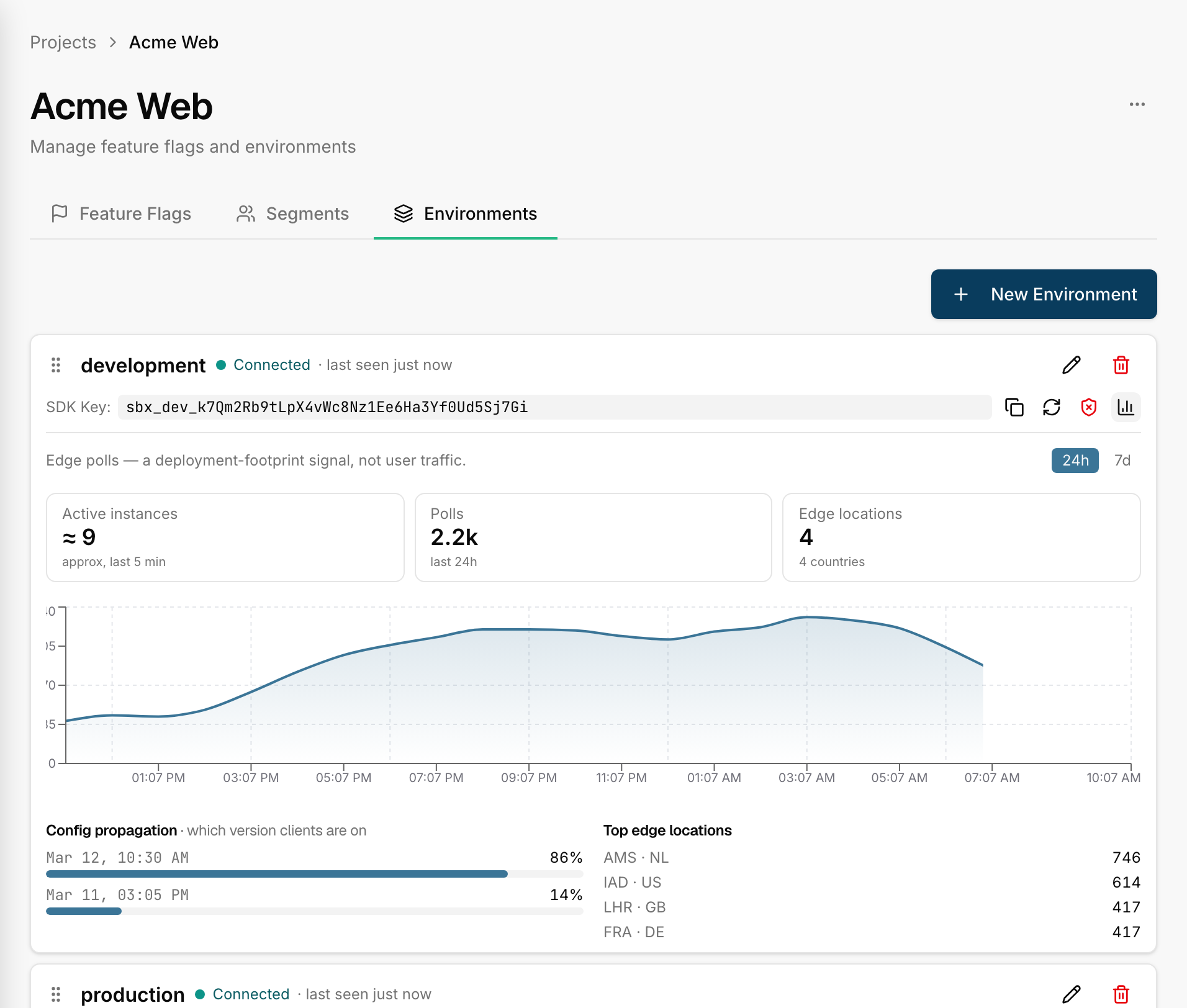
The dashboard gives you three delivery signals per environment: a live connection badge and usage graphs (both observing config fetches on the read path), and flag usage (anonymous per-flag evaluation counts, reported separately by the SDKs). All three are about confirming that your flags are being delivered and used — they are deliberately not analytics about your users.
The Connected badge
Each environment shows a connection badge:
- Connected ✓ — an SDK using this environment's key has fetched the config recently.
- Never — no fetch has been seen for this key yet.
The first time any client fetches the config, the badge flips to Connected within
seconds — this is the payoff moment in every quickstart. It's
the fastest way to confirm your sdk_key is correct and your app is wired up.
Usage graphs
The usage panel charts how often the config is being fetched from the edge over a window you pick (last hour, day, week). It's useful for confirming traffic is flowing and spotting a sudden drop (a deploy that broke SDK setup, say).
Flag usage
Each environment also carries a flag usage panel, fed by the SDKs' anonymous
usage telemetry. Unlike the polls above, this travels on its own channel: each
SDK counts evaluations locally and flushes an aggregate summary (per-flag counts
and value distribution, plus the SDK's name and version) to the edge about once
a minute, keyed by the environment's SDK key — no identity, no user context, no
cookies. It is on by default; disable it per client with telemetry: false
(config delivery is unaffected). Per flag the panel shows:
- Evaluation counts over the window you pick — is this flag actually being checked in code?
- Value distribution — what share of evaluations resolved to each value. A quick sanity check that a 20% rollout really serves ~20%.
- Staleness — a flag that was evaluated once but not lately is marked with its last-seen time, a hint that it may be safe to archive.
- SDK versions — which SDK names and versions are reporting, so an outdated client stands out.
Read the labels honestly
None of these signals are user analytics. Specifically:
- In the usage graphs, a data point is a poll — an SDK fetching
flags.json— and the count reflects running SDK instances, not unique people. Ten server processes polling is ten times the traffic of one, for the same number of end users. - In the flag usage panel, a data point is an evaluation — an
enabled()orgetValue()call — carrying no identity, so one user checking a flag a thousand times and a thousand users checking once look the same.
So these are delivery health signals — "is my config reaching clients, and
are my flags being used" — not a daily-active-users or engagement metric. Don't
read them as DAU. To measure exposures against your own users, wire
onEvaluation into your analytics.
Next
- How it works — the read path these signals observe.
- Measure in your own analytics — per-user exposures, in your tool.
- Troubleshooting & FAQ — when the badge says Never.