Projects & environments
Organising flags into projects and environments.
Projects and environments are how you organise flags in the dashboard. This page walks through both.
Projects
A project groups related flags — typically one project per application or
service. Create one from the Projects page; give it a name (e.g. web-app).
Flags live inside a project and are referenced by key, so two projects can each
have their own new_checkout without collision.
Projects belong to a team (your account starts with a personal one). If you're working with a team, everyone in the team sees its projects; what they can change depends on their role (Admin / Editor / Viewer).
Environments
Open a project and go to its Environments tab. Every project is created with two environments:
development— for local and pre-production work.production— for live traffic.
Each environment is an independent set of flag values with its own
SDK key. The same flag can be on in development
and off in production.
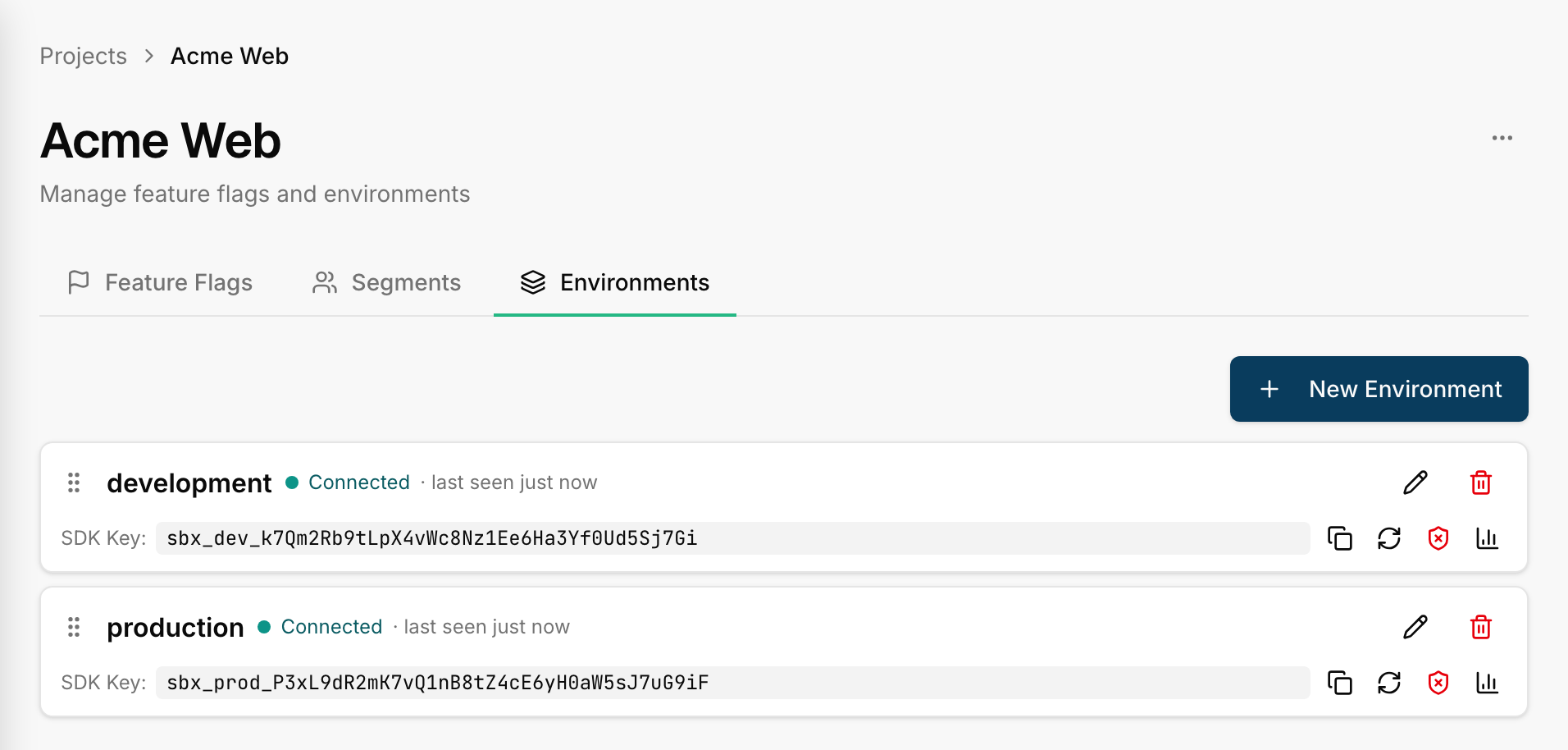
Managing environments
- Add — create more environments (e.g.
staging,qa). Names are free-form. - Rename — names are just labels; renaming doesn't change the SDK key.
- Reorder — drag environments to set the order they appear across the UI.
- Delete — remove an environment you no longer need. You can't delete the last one — a project always has at least one environment.
When you add an environment, Switchbox creates the flag rows for it automatically: every existing flag gets an entry in the new environment, inheriting sensible defaults until you target it.
Next
- Creating & editing flags — add flags to a project.
- Rotating an SDK key — when a key needs to change.